Sharing
Get newsletters out to everyone in a few clicks.
All Smore users can send their newsletters via email or share a direct link. Smore for Teams enables you to embed newsletters on your website or share them through Mass Notification Systems for easier access. Connect with our team to see how Smore for Teams supports stronger communication.
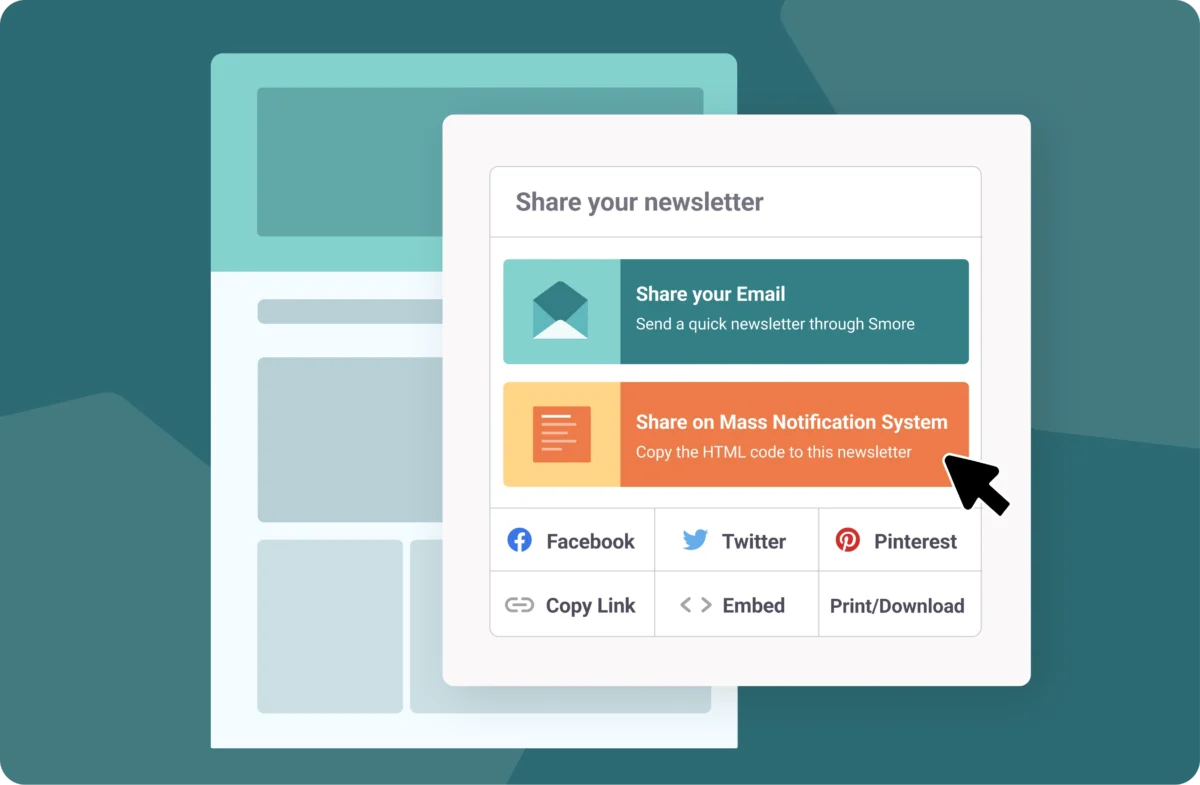
It’s easy to share a Smore newsletter with staff members, families, or your broader community. You can build and manage email lists within Smore, and create specific groups, like families associated with a single school site. Once lists are created, newsletters can be sent to a single list or multiple.
You can also share the link to your newsletter anywhere you choose, including social media posts.
Our most popular share option amongst school and district leaders is MNS export, which allows you to post your newsletter wherever you share other family updates, like parent portals or mass notification systems. Easily share a single newsletter on all of your communications channels so everyone can access the information.
FAQs
Can I share Smore newsletters on my MNS, like SchoolStatus Connect?

Can I share Smore newsletters on my district's social media site?
Is there a limit to how many people I can email my newsletter to?
One of the best parts of Smore is that it is so incredibly simple and not overwhelming for even the most beginner user. Anyone can truly create custom, professional newsletters.”
Joan DePrenger,Teacher Librarian, Iowa City Community School District