Analytics
Use data to improve your newsletters.
All Smore users have access to newsletter analytics. Smore for Teams offers a deeper set of insights to help schools and districts understand engagement across buildings and groups, as well as staff usage. If you want to explore the full range of analytics available in Smore for Teams.
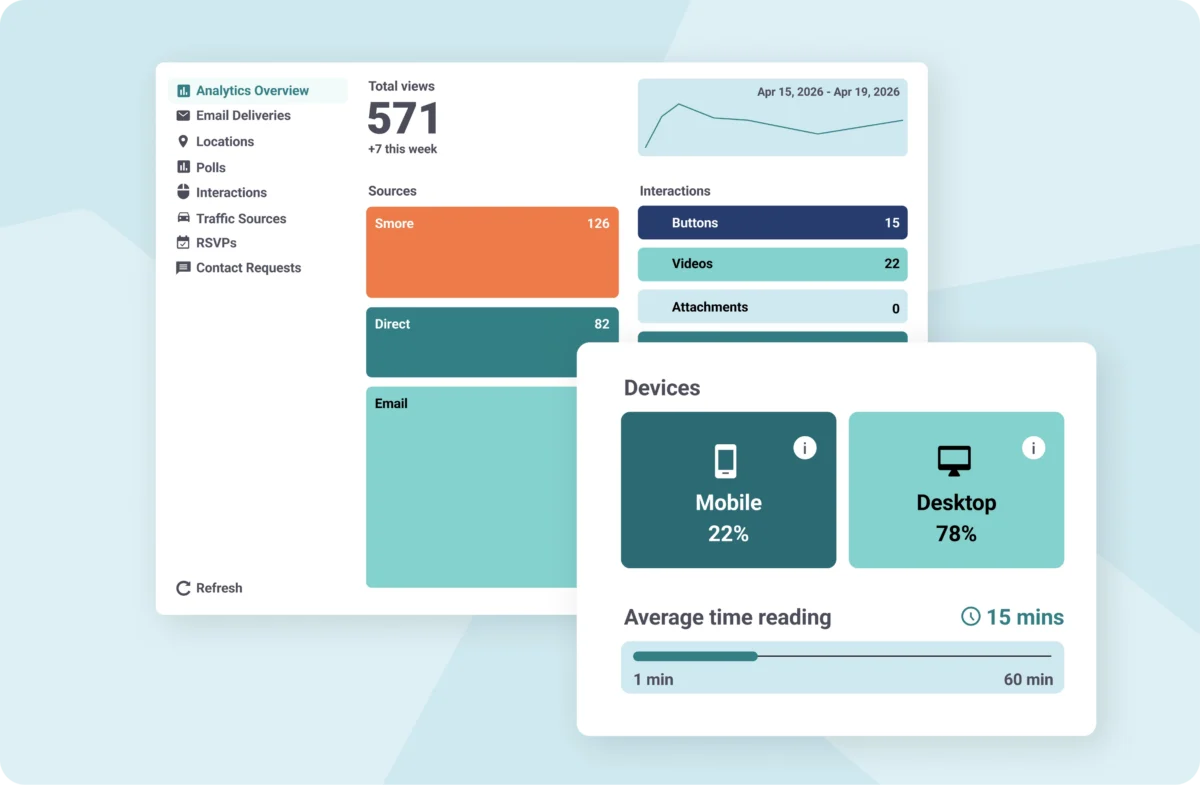
Smore provides easy-to-understand analytics that help you see how readers are engaging with your content.
- Open rates: The percentage of recipients who opened your email. Use this stat to see which subject lines are most compelling.
- Team engagement: A report for administrators on Smore for Teams accounts that shows who’s sending newsletters and how many. Use the report to grow usage in your district.
- Interactions (Click-through rate): The number of readers who clicked a link inside your newsletter. Use this metric to gauge which content captured readers’ interest.
- Read time (Engagement rate): How long readers spent with your newsletter. Find out whether people are skimming or reading more deeply.
- Traffic source: Where readers found your newsletter. Use these metrics to see how the majority of readers are accessing your newsletters, such as through a direct link, social media, or your mass notification system.
- Devices: The number of readers accessing your newsletters on a mobile device or computer. This metric can help you decide how to best organize the content in your newsletter. Plus, Smore newsletters are mobile-friendly, so they look great on any device!
- Locations: Where readers were located when they viewed your newsletter. This gives you a sense of your geographic reach and can be a fun metric to check.
Analyzing the data available in Smore makes it possible to ensure your newsletters are reaching the right audience with content they want to read.
FAQs
Can administrators on Smore for Teams accounts see how the account is being used?

What kinds of analytics are available for Smore newsletters?
Can administrators on Smore for Teams accounts see analytics for every newsletter sent?
“Before using Smore, I’m not sure how many people actually read my weekly communication. Now, with Smore, my notes are more colorful, interactive, and engaging. Plus, I’m able to see how many people are going to my weekly link!”
Mike Thompson,Elementary Principal, Harris Lake Park Schools in Iowa