Smore is Now WCAG 2.1 AA Compliant
If you’ve been following along, you know that Smore’s been WCAG 2.1 A compliant for a while. But as of today, we officially meet WCAG 2.1 AA accessibility standards.
That means that Smore newsletters now comply with even more rigorous accessibility standards, making them readable for more families and accessible to more of your staff.
Stay ahead of accessibility requirements
Accessible school communication is quickly becoming the legal standard. At the state level, mandates like Colorado’s 2025 deadline are raising the bar for web content accessibility in education. On the federal level, new regulations are expected that could require WCAG 2.1 AA compliance by April 2026.
With Smore, your district is already ahead of the curve.
Every newsletter you create is compliant. Teachers and staff can write with confidence, knowing their content meets school accessibility standards, and every family can engage.
Empower every staff member to communicate
Meeting WCAG 2.1 AA standards matters, but adopting a more accessible newsletter platform also has benefits for your team. Now, every teacher, staff member, and administrator can share updates.
For educators who use assistive technology, Smore makes content creation simple. Smore is compatible with screen readers and keyboard-only navigation. We’ve made sure that features work seamlessly for creators who use assistive technology, ensuring every voice in your district can be heard.
Reach every family more equitably
A more accessible Smore means that more families can engage with your content, too.
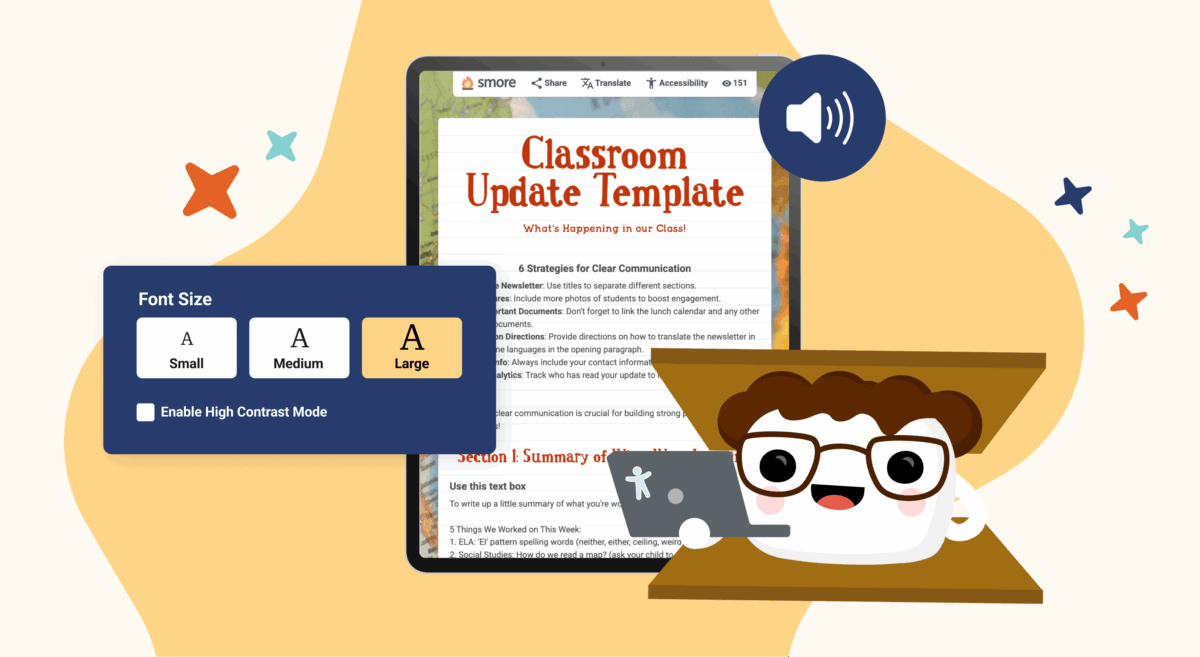
Adjustable font sizes, high-contrast viewing mode, and alt text for images make Smore newsletters easier to navigate. Whether a family is reading on a mobile phone, relying on a screen reader, or simply prefers larger text, Smore meets them where they are.
When every family can easily access your updates, you can look forward to an even more connected school community.
Built-in accessibility for every educator
With Smore, creating accessible school newsletters doesn’t require extra steps, settings, or add-ons. No matter which plan you use, accessibility is always included.
Whether you’re a teacher sending an occasional class update on the free version or a district leader using Smore for Teams to manage a districtwide communication strategy, you get the same built-in features.
What’s Next?
We believe that accessibility is of paramount importance, especially in education. As we continue building Smore, we’ll keep prioritizing equity, ease, and inclusion.
If you’re a district leader looking for an accessible school communication platform, we’d love to show you around Smore for Teams. If you’re a teacher hoping to send inclusive newsletters that engage every family, sign up free. It’s easy to get started, and we even have free templates for you to choose from.
Want to learn more about accessibility on Smore? Check out our accessibility page.
FAQs
What is WCAG 2.1 AA, and why does it matter for schools?

Does Smore meet all WCAG 2.1 AA requirements?
Do I need to turn on accessibility features in Smore?
Does this change how my team uses Smore?
Is the Smore Free plan accessible?