The Principal’s Guide to Building a School-Wide Communication Culture

TL;DR
Strong school communication culture happens when everyone’s on the same page—literally. Successful principals create shared templates, establish consistent messaging rhythms, and use collaborative tools to ensure all staff communicate with the same professional quality.
Walk through any school and you’ll see the communication challenge: one teacher sends beautifully designed newsletters, another relies on basic email, and a third still stuffs paper handouts in backpacks. Each approach works on its own, but together they create a disjointed experience for families.
The solution? Creating systems that make consistent, professional communication the easy choice for everyone.
Why Communication Culture Matters More Than You Think
When families receive professional, consistent communication from every teacher, they develop confidence in your school’s overall organization and attention to detail. When communication is scattered and inconsistent, it signals dysfunction—even when everything else is running smoothly.
One principal captured this sentiment perfectly: “When your student starts as a kindergartner, you know exactly what that newsletter is going to look like. Then they go into middle school, and while so much changes, one thing stays consistent—our newsletters.”
That consistency creates trust. And trust is what keeps families engaged year after year.
The August Setup: Your Pre-School Communication Plan
Step 1: Choose Your Platform (And Stick With It)
The biggest mistake principals make is letting teachers use whatever communication tool they prefer. This creates confusion for families and makes it impossible to maintain brand consistency. The key is picking one platform that works for everyone and committing to it school-wide.
Your action item: Before the first day of school, have every teacher set up on the same communication platform. Provide the training, templates, and support they need to feel confident using it.
Step 2: Create Your Template Library
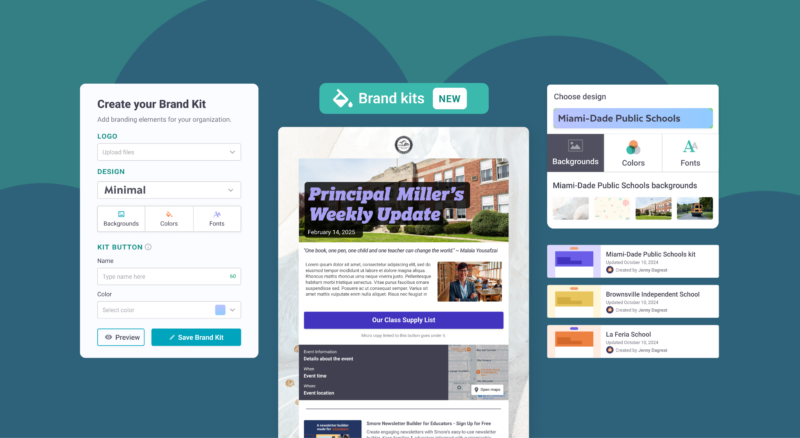
Instead of starting from scratch every week, successful schools create a library of branded templates that teachers can customize for their classroom needs.
Rebecca Preston, a principal in Kentucky, saw immediate results: “Before Smore, I was spending 2-3 hours getting caught up in the formatting and organization of my newsletters. Now I have created a system that helps me spend 30 minutes on my newsletter.”
Your template essentials:
- Weekly classroom newsletter
- Event announcement
- Permission slip/form communication
- Emergency or time-sensitive update
- Monthly curriculum overview
Step 3: Establish Your Communication Rhythm
Families thrive on predictability. When they know to expect updates on the same day each week, they start looking forward to them rather than feeling overwhelmed by random messages.
Mike Thompson, an elementary principal in Iowa, discovered this firsthand: “Before Smore, I’m not sure how many people actually read my weekly communication. Now, with Smore, my notes are more colorful, interactive, and engaging. Plus, I’m able to see how many people are going to my weekly link!”
Your rhythm framework:
- Principal updates: Same day each week (many choose Sunday evenings or Monday mornings)
- Classroom newsletters: Consistent day across all teachers
- Event reminders: Standard timeline (2 weeks out, 1 week out, day before)
- Emergency communications: Clear protocols everyone follows
The Collaboration Tools That Actually Work
Shared Folders and Asset Management
Smore’s shared folders let you create a central hub where teachers can access approved templates, photos, and branded materials. Set up folders for:
- Templates (view-only to preserve formatting)
- Approved school photos and graphics
- Current event information and announcements
- Archive of successful communications for reference
Live Collaboration Features
When multiple people need to work on the same communication, Smore’s real-time collaboration prevents the version control nightmare of emailing documents back and forth.
Pro tip: Use this for sensitive communications that need review before sending, like discipline policy updates or crisis communications.
Management Dashboard Oversight
As the principal, you can see what’s being sent, when it’s scheduled, and how families are engaging with each teacher’s communications. The goal here is to support teachers who might be struggling with engagement and celebrate those who are crushing it.
Training Your Team (Without Adding to Their Plate)
The 15-Minute Faculty Meeting Approach
Don’t try to cover everything in one marathon training session. Instead, dedicate 15 minutes of each faculty meeting in August to communication culture:
Week 1: Platform overview and account setup
Week 2: Template selection and customization
Week 3: Scheduling and timing best practices
Week 4: Analytics basics and what to track
Create Communication Champions
Identify 2-3 teachers who are naturally good communicators or tech-savvy. Train them first, then have them support their colleagues. This peer-to-peer approach reduces resistance and builds buy-in.
Bonnie Hall, a principal in Illinois, saw this approach transform her school: “Before Smore, my newsletters resembled typed memos; after Smore, my newsletters are ‘works of heart’ from the school, filled with pictures of our students, videos, articles, clip art, and other engaging tools to keep our faculty and families informed.”
Handling the Common Challenges
“I Don’t Have Time for This”
Start with templates that require minimal customization. A teacher should be able to update their weekly newsletter in under 10 minutes once they have a system.
“My Families Don’t Read Digital Communications”
Track the analytics and share the data. Most principals are surprised to discover their open rates are higher than they expected. Also, ensure your platform works well on mobile devices since most parents read school communications on their phones.
“What About Privacy and Approval?”
Set clear guidelines about what types of information can be shared directly and what needs principal approval. Create workflows for sensitive topics while keeping routine communications flowing smoothly.
Measuring Success
Track these key indicators of a strong communication culture:
Engagement metrics: Are families opening and reading communications across different classrooms?
Consistency scores: Do your communications look like they come from the same school?
Staff confidence: Are teachers feeling supported and equipped to communicate effectively?
Family feedback: Are parents commenting positively on the quality and usefulness of school communications?
Your August Action Plan
- Week 1: Choose your platform and set up school-wide accounts
- Week 2: Create your template library with school branding
- Week 3: Train your communication champions
- Week 4: Roll out to all staff with peer support
- First month of school: Monitor, adjust, and celebrate early wins
Building a school-wide communication culture takes intentional effort upfront, but the payoff is huge. Families feel more connected, teachers feel more confident, and you can focus on education instead of putting out communication fires.
Ready to build a stronger communication culture at your school? Learn how Smore for Teams can streamline your school’s communication and create the consistency families appreciate.
Frequently Asked Questions
How can I create a school communication plan?

What is a principal communication strategy?
How can I ensure consistency in my school newsletter?